

切换应用,文件跟上。Switch apps. Keep your files close.
先拖进置物区,再拖到邮件、聊天或下一个项目里。文字和链接也一样。Drop something on the Shelf, then drag it into an email, a chat, or your next project. Text and links work too.


小伙伴在路上Friends on the way
带着日常,环游世界LITTLE COMPANIONS. A WHOLE WORLD.
日常 Mac 工具,随手可用的组件。
围绕你的 Island,放在一起。Everyday Mac tools. Useful components.
Together around your Island.
赛道暂时无法显示,仍可浏览下方功能介绍。The race is unavailable. Explore Sill’s features below.
Sill 2.0.0 build 8 已进入 TestFlight 测试。公开访问与 App Store 正式发布尚未公布。Sill 2.0.0 build 8 is in TestFlight testing. Public access and the App Store release have not been announced. 查看 2.0 完整页面Open the complete 2.0 page
全新 2.0.0 实机演示,英文配音与英文字幕。Build 8 已进入 TestFlight 测试。New 2.0.0 footage with English narration and captions. Build 8 is in TestFlight testing.
点击播放后才会连接 YouTube。YouTube connects after you choose to play. 在 YouTube 观看Watch on YouTube
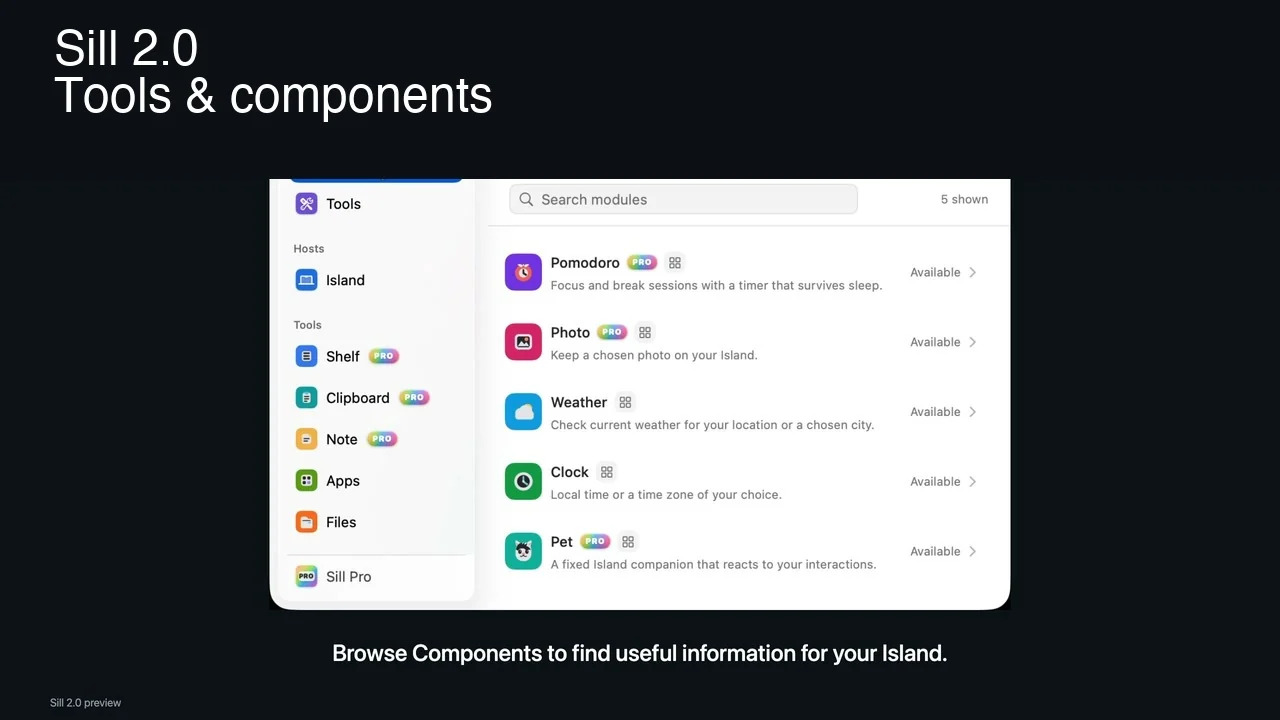
从主窗口选择需要的工具和组件:用 Apps 启动应用,用 Files 浏览文件,把时钟和天气留在 Island。Pro 再加入置物、Note、翻译与下一段专注时间。Choose tools and components in the main window. Launch apps with Apps, browse folders with Files, and keep Clock and Weather on your Island. Pro adds Shelf, Note, Translate, and time to focus.
看看 Island 能放什么Explore what fits on your Island 10:09周六,放慢一点Saturday, take it slow
 周末去海边A trip to the coast记得带相机。Remember the camera.
Weekend plans.pdf128 KB
周末去海边A trip to the coast记得带相机。Remember the camera.
Weekend plans.pdf128 KB
先拖进置物区,再拖到邮件、聊天或下一个项目里。文字和链接也一样。Drop something on the Shelf, then drag it into an email, a chat, or your next project. Text and links work too.

让计时和天气留在岛上,需要处理文字时,再打开翻译、Note或剪贴板。Keep a timer or weather on the Island. Open Translate, Note, or Clipboard when you need to work with text.

用组件看状态,用工具完成操作。按你的习惯选择、组合,不必把所有东西同时打开。Use components to see what is happening and tools to get something done. Choose the combination that fits your day.
时钟、照片、天气、动态背景和小伙伴,都可以成为 Island 的一部分。Pobb 和茄博士是其中的角色,陪着你的日常一起发生。Clocks, photos, weather, living backgrounds, and companions can all be part of your Island. Pobb and Professor Aubie are two of the characters sharing that space.
认识岛上的伙伴与风景Explore companions and scenes

Free 提供应用、文件、时钟与天气。Pro 一次买断,加入内容工具、更多组件与动态背景。Free includes Apps, Files, Clock, and Weather. Pro is a one-time purchase for content tools, more components, and living backgrounds.
可免费试用 7 天,不会自动续费或扣费。购买及恢复由 App Store 处理。World Landmarks 包含在 Pro 与有效试用中,其他扩展包按各自说明提供。Try Pro free for 7 days, with no automatic renewal or charge. Purchases and restoration are handled through the App Store. World Landmarks is included with Pro and an active trial; other packs follow their own terms.
查看具体功能与使用条件See capabilities and requirements在主窗口浏览工具与组件,用 Apps 和 Files 启动应用、浏览文件,让时钟、天气或其他组件留在 Island。Pro 可添加置物、Note、剪贴板、翻译,以及专注、照片和岛上伙伴。
Browse tools and components in the main window. Use Apps and Files to launch apps and browse folders, and keep Clock, Weather, or other components on your Island. Pro adds Shelf, Note, Clipboard, Translate, Pomodoro, Photo, and companions.
Free 包含 Apps 和 Files 工具、时钟和天气组件,以及 Island 外观、布局、快捷键和显示位置等基础设置。Pro 增加不限量收纳、Note、剪贴板历史、翻译、番茄钟、照片和岛上伙伴,以及 OCR 搜索、敏感内容保护、内置动态背景和自定义图片背景。
Free includes Apps and Files tools, Clock and Weather components, and basic Island appearance, layout, shortcut, and display-placement settings. Pro adds unlimited Shelf, Note, Clipboard history, Translate, Pomodoro, Photo, companions, OCR search, sensitive-content protection, included living backgrounds, and custom image backgrounds.
彩虹赛道是网站上的互动演示,用来展示不同内容如何汇入 Island。App 中,Pobb 和茄博士是岛上伙伴体验中的角色,可以和其他组件一起使用。
The rainbow race is an interactive website demo showing how different content arrives on the Island. In the app, Pobb and Professor Aubie are characters in the Island companion experience, alongside other components.
可以。Island 显示在屏幕顶部,有刘海和无刘海的 Mac 都可使用。Free 和 Pro 都支持显示位置与收起展开设置;具体工具和组件按各自的功能范围使用。
Yes. The Island appears at the top of displays with or without a notch. Free and Pro both support display placement and collapsing or expanding; each tool and component follows its own access requirements.
收纳和本地内容管理不需要联网。翻译会把你提交的文字发送给所选服务,天气需要联网获取数据。文件工具访问你选择的本地文件夹。剪贴板历史在本机加密保存,默认关闭。
The Shelf and local content management work offline. Translate sends submitted text to your selected service, and Weather fetches data online. Files accesses local folders you choose. Clipboard history is encrypted locally and off by default.
不是。Sill Pro 一次买断,可通过 App Store 免费试用 7 天,不会自动续费或扣费。试用到期后,已有内容与设置保留,Free 功能继续可用;Pro 组件和工具暂停。可在 App 中恢复既有购买。
No. Sill Pro is a one-time purchase with a free 7-day App Store trial that does not renew or charge automatically. Your content and settings remain after the trial, and Free features continue working; Pro components and tools pause. Restore previous purchases in the app.
需要 macOS 14 或更高版本,无需 Sill 账号。下载、试用和购买使用你的 App Store 账号。
Sill requires macOS 14 or later and no Sill account. Downloads, trials, and purchases use your App Store account.
Sill 2.0.0 build 8 已进入 TestFlight 测试。公开 TestFlight 与 Mac App Store 正式发布尚未公布;网站的 App Store 链接打开当前已发布版本。
Sill 2.0.0 build 8 is in TestFlight testing. Public TestFlight access and the Mac App Store release have not been announced. The App Store link opens the currently published version.

从文件、时钟和Note开始。macOS 14+。Start with files, Clock, and Note. macOS 14+.